Concept Project
LitMap
SCOPE
Mobile
CONCEPT
Personal Project
LitMap attempts to take reading habits out of list format and turn them into a personal world atlas. A motivation tool for light readers, a meaningful data experience for heavy ones.


123
Kodu tara
9:41
9:41
Explore the World Literature
Based on your favourite genres

Fiction


Ceyda Tuncel
Posted about a book
Lorem ipsum dolor sit amet consectetur. Eget a nisl proin eget interdum tristique vel nulla commodo. Enim eros urna diam eu amet vitae pellentesque non. In tristique turpis pharetra nunc donec ac morbi. Molestie euismod vel quam viverra in.

The Castle
German Literature
Franz Kafka
Want to Read
New Releases for you
See All
See All


Fiction


Franz Kafka Week!
Join the Week
Home
Explore
My Collection
Profile
Why This Project?
The Spark
Almost everyone wants to build a reading habit but sustaining it, discovering new things, and actually feeling your progress is a different story. Existing platforms like Goodreads let you track what you've read, but they don't help you understand it. Your data sits in a list, static and flat.
At the same time, habit trackers have shown us something important: people engage far more deeply when their data is visual. You map your runs, you chart your sleep. Reading deserved the same treatment.
LitMap is a concept mobile app that turns your reading history into a personal world map a motivation tool for light readers, a meaningful atlas for heavy ones.
Benchmark
What Are Competitors Doing?
Personal Reading Map
Gamification (Badges, Avatars)
Book Recommendation Algorithm
Social Interaction
Monthly & Weekly Reading Statistics
User-Generated Content (Reviews, Notes)
Goodreads
StoryGraph
LibraryThing
Literal Club
Before shaping the idea further, I looked at existing apps. Goodreads, StoryGraph, LibraryThing, and Literal Club.
The most striking thing in the comparison table: the Personal Reading Map row was empty across all four. Nobody had done this. Gamification, social interaction, reading statistics existed to varying degrees. But nothing turned reading habits into a geographic, visual map.
That gap showed me exactly where LitMap would sit. Not rebuilding what already exists, but entering an unfilled space.
Survey and Findings
Getting to Know the User
Even though this was a concept project, I wanted to run a real user research process. I conducted a survey with 19 participants. My goal wasn't to be validated, it was to be directed.
Participants were between 24–34, with moderate to high interest in world literature, and actively using digital book tracking tools.
Three findings stood out:
Choice overload is a real problem. Users are eager to discover new books and literary genres, but they get lost when they see too many options. "My reading list has piled up and I don't know where to start" came up again and again.
Social discovery is a strong motivator. 89% of participants said they found it highly interesting to see other users' reading lists and statistics. But existing platforms either don't offer this at all or keep it very surface-level.
My geographic recommendation hypothesis split 50/50. When I asked whether a book being from a specific country made it more appealing, half the participants said "yes, it's a great way to discover that culture" while the other half said "for me it's about genre, not geography."
This finding was initially jarring enough to make me question the entire map concept. But in the end, it led to a much better design decision:
The map shouldn't be a mandatory, imposing layer, it should be an enriching visual layer that users can engage with if they choose. For users who don't care about geography, a classic list view should always be accessible.
Wireframes
First Design

The initial flow was: user opens the app, selects preferences, reaches the map, taps countries, tracks books.
It was a visually consistent, functional flow. But when I reviewed it, I saw two fundamental problems:
DESIGN
Onboarding
When the map first opened, it was empty. For a new user, this is a major broken promise. The app says "here's your reading map" but the screen is completely blank. That kills motivation and renders the concept meaningless. To prevent the reading map from opening completely blank, the onboarding flow collects a small amount of meaningful data before the user reaches the map.
If the user enters the book they are currently reading, the country it belongs to will be colored on the map and the book will be added to their library in advance.
Countries the user wants to explore will be colored as "explored" areas on the map, preventing the map from opening completely blank.
Using data from books the user has previously read, linked via Goodreads, discovered countries are automatically colored on the map.

The user can select the literatures they want to explore, add the book they are currently reading, or optionally import their previous reading data from Goodreads. This way, the map feels alive from the first interaction. Instead of presenting an empty product promise, the experience gives users an immediate sense of progress, personalization, and motivation to continue exploring world literature.
Exploring the Map
In the first version, every read country filled with a single flat color. Simple, but not enough. It only told the user "read / not read" and nothing else.
I landed on three meaningful states:
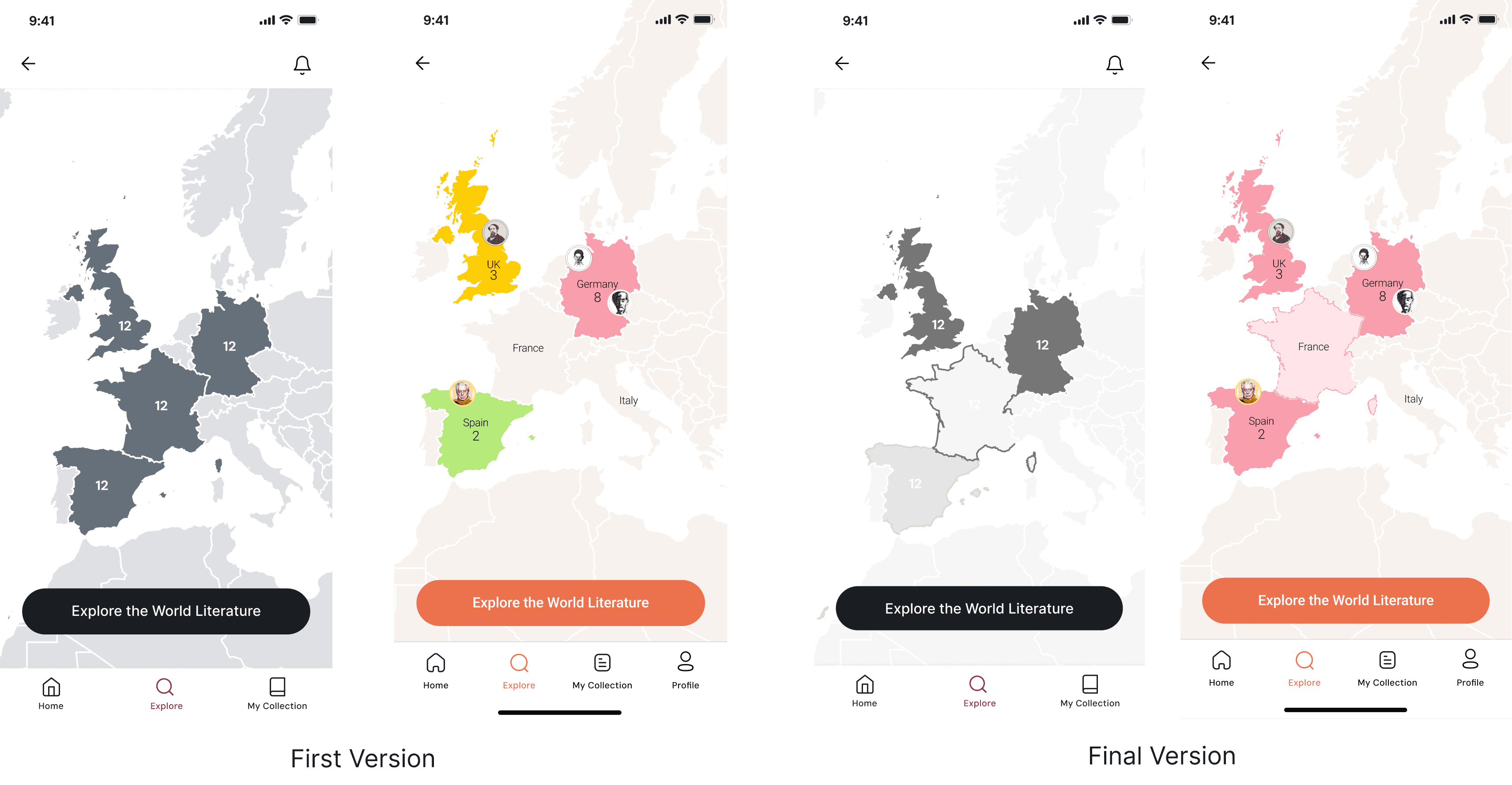
I built the color system around seven geographic regions rather than individual countries. All of Europe shares one color, all of Asia another. Assigning a unique color to every country would be both unmanageable and visually chaotic.
Map Color System: Three Layers


8
Germany
UK
Italy
France
Spain
3
2


Explore the World Literature
Home
Explore
My Collection
Profile
9:41
9:41
Explore the World Literature
Hidden Gems from South America
See All
Fiction
Home
Explore
My Collection
Profile
Th|
English
German
French
French
French
French
For You

Fiction
New in Japanese
See All
Fiction
Behind this decision is the 50/50 split from the survey. The map isn't imposed on anyone but it's there, as an enriching layer.
This system works for both user profiles: for a light reader, the map isn't empty, wishlist countries appear with dashes, reminding them "you haven't been here yet, but you wanted to go." For a heavy reader, the map becomes a personal atlas, explored regions grow vivid, open spaces wait to be discovered.
Breaking the Empty Country Page
9:41
Italian Literature
You dont have any Italian Book in your library
Add Books
Bestsellers in Italian Literature


People voted 5 stars


Your friends read
Based on your friends activities


Sadie Core
Posted about a book
I did not expect Dante’s Inferno to be easy, but it was not as hard as I expected it to be. In order to make sure that I gave it my all, over the course of about 40 days I listened to it twice, had a physical copy that I skimmed and referenced, looked at online study guides, and discus... with some of my Goodreads friends. While I still feel there is more here to be learned and grasped due to all the symbolism and word craft used by Dante, I feel like I at least got a good feel for it in my Divine Comedy rookie status.

Inferno
Dante
Want to Read
Home
Explore
My Collection
Profile
In the first design, an empty country page said: "You don't have any Italian book in your library" with an "Add Books" button below.
This is a dead end. The user doesn't know what to do. If they tap "Add Books," where do they go? What do they search for? No guidance at all.
Choice overload was the strongest pain point in my survey data. The solution came from the same place: fewer options, more context.
Italian Literature
9:41
You dont have any Italian Book in your Library
Your first stop in Italy!
The Name of the Rose
Umberto Eco
Mystery
Matches your love for Mystery - Loved by 3 of your friends
Want to Read
Books for your fav genres in Italian
Handpicked based on your reading preferences.
Bestsellers in Italian Literature
Handpicked based on your reading preferences.
In the new version, the empty country page does this:
It recommends a single book. Below the recommendation, two lines of explanation: "Matches your love for Mystery · Loved by 3 of your friends." Genre match and social proof, both directly derived from the survey findings.
If the user accepts, they add it to their wishlist with "Want to Read." If they don't, they can scroll down "Books for your favourite genres in Italian".
A single recommendation breaks choice paralysis. The option to keep scrolling doesn't close the door for users who want to explore. The two work together.
Recommendation Mechanism — The Shuffle Decision
When designing the recommendation system, I asked myself: how do you make a recommendation that guides without creating choice paralysis? The classic book app answer: a list. 10–20 suggestions, scroll, pick. But that's exactly what the survey called "choice overload."
LitMap's answer is different: one recommendation, one shuffle button.

"Here's your next stop. You've never been to Argentina — you could start with Borges." Don't like it? Shuffle — a new recommendation comes. The user doesn't lose control, but they're also not drowning in dozens of options.
This mechanism is also consistent with the map metaphor: when you travel, you pick one destination at a time. You can't visit the entire world at once.
Profile: The Moment Before the Data
The most powerful thing about this page isn't numbers, it's moments. "You entered Brazilian literature for the first time this month" that's not a statistic, it's an experience. And that experience was getting buried under a pie chart.

Hero card at the top: "First touch with Brazilian Literature · The Hour of the Star — Clarice Lispector." Large, typographic, emotional. The first thing users see when they open the page.
Secondary grid in the middle: Read 10 books this month · Most read author: Mieko Kawakami. Numerical data lives here, smaller.

What I Learned
LitMap attempts to take reading habits out of list format and turn them into a personal world atlas. A motivation tool for light readers, a meaningful data experience for heavy ones.
The most valuable learning in this project came from research. When I first saw the 50/50 geographic split, I thought my core hypothesis had collapsed. But that finding actually led to a more honest design decision: the map isn't imposed on anyone, but it's there. Those who want it go deeper; those who don't switch to list view.
Research is done to be directed, not validated. This project made that clear.
Next steps: User testing to measure how the empty state and recommendation mechanism work in real use. Integrating a Goodreads import into onboarding. Building an interactive prototype of the core recommendation flow through vibe coding.
Think about why Spotify Wrapped goes viral every year: every data point is presented as a moment. Not a number, a story. The Profile page was built with that logic.
